 Loading...
Sprunke (Sprunki) Hypershifted Pepper’s Take
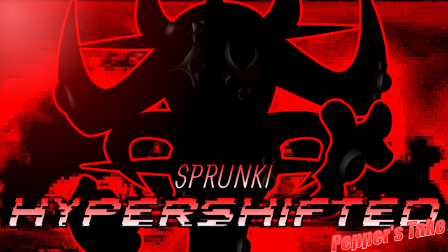
Sprunke (Sprunki) Hypershifted Pepper's Take is a horror music mod by pepper666 with a red-and-black stage and a distorted cast.
This page features the full itch.io release, not the stripped-down version shared on Cocrea. Pepper's take on Hypershifted puts familiar characters into unsettling new forms, with animated performers and musical parts you can combine into your own arrangement.
The stage looks like a damaged broadcast. Static runs across a dark red background, black shapes loom behind the lineup, and red lightning cuts through the scene. Even the empty performers have fixed smiles and thin black streaks beneath their eyes. Adding characters introduces more elaborate designs, including hollow-eyed faces, mechanical parts, and sharp metal structures. Camera movement and flashes can make a single addition change the feel of the whole screen.
The character designs have given the mod community plenty to discuss. Players have singled out Brud's traffic-light look, while Durple's appearance has prompted questions about what happened to him. These reactions capture the mix of odd visual humor and horror in Pepper's version without turning every unusual detail into a confirmed storyline.
Try a few characters on their own before building a fuller mix. It is easier to notice individual animations and hear how each part changes the arrangement when you leave some space in the lineup. You can also explore the Gallery or adjust the presentation through Settings.
The mod contains disturbing imagery and flashing effects. Settings includes options to remove bright flashes and camera movement, plus an MFC Censored option for Mr. Fun Computer's profanity.
How To Play Sprunke (Sprunki) Hypershifted Pepper’s Take
- 1.Wait for the game to load, then click the start button or green flag.
- 2.Open Settings before playing if you want to remove bright flashes or camera movement. Look for FLASHES and MOVE CAMERA.
- 3.Drag an icon from the selection area onto an empty performer to activate that character.
- 4.Add more characters to combine their parts. Start with a small lineup so you can hear each addition clearly.
- 5.Move your mouse over an active character to reveal its controls. Use the speaker button to mute it, headphones to hear it solo, or X to remove it.
- 6.Use the circular reset button in the upper-right corner to clear the arrangement and start again.
Comments
8 Comments
Leave a Comment
Latest Games
Sprunki Pepper’s Take
Sprunke (Sprunki) Phase 3: The Angels of Heaven (Animated)
Sprunki Anti Shifted: False Armageddon (Beta Release)
Sprunki Phase 5 Definitive: The Fatal Lie (REUPLOAD)
Sprunki 9-Shifted (Niki and Footlong’s Take)
Sprunki 13-Shifted Niki’s Take
![Sprunki Reversed Phase 9 [OFFICIAL]](https://sprunkigame.io/wp-content/uploads/thumbs/custom/R/Reversed-Phase-9-OFFICIAL-300x315.png)
Sprunki Reversed Phase 9 [OFFICIAL]
Sprunki Saja Boys Treatment
Sprunke (Sprunki) 18-Shifted Pepper’s Take

Animal Hospital Sprunki
Similar Games
Sprunke (Sprunki) 18-Shifted Pepper’s Take


Sprunke (Sprunki) Shifted Pepper’s Take

Sprunke (Sprunki): Hypershifted Phase 2 Official Remaster
Sprunki 12-Shifted Pepper’s Take
Sprunke (Sprunki) Anti-Shifted Pepper’s Take
Sprunke (Sprunki) Pepper’s Realm
Sprunke (Sprunki) Bi Shifted Phase 4
Sprunke (Sprunki) Infected Remastered
Sprunke (Sprunki) Betters And Loses Phase 4
Sprunke (Sprunki) Beat Attack

![Sprunki Pyramixed V0.9 [update] but with My OCS](https://sprunkigame.io/wp-content/uploads/thumbs/custom/S/Sprunki-Pyramixed-V0.9-update-but-with-My-OCS-150x113.png)
![ParaSprunki [UPDATE 15.0 PART 2]](https://sprunkigame.io/wp-content/uploads/thumbs/custom/P/ParaSprunki-UPDATE-15.0-PART-2-150x112.png)

Hihi
My name im kien
Crazy mod
This is taken forever to load up the game 😴
Not to lie Simon,s sound is great
My create
Gray sounds absolutely cinema
good mod