 Loading...
Sprunke (Sprunki): Hypershifted Phase 2 Official Remaster
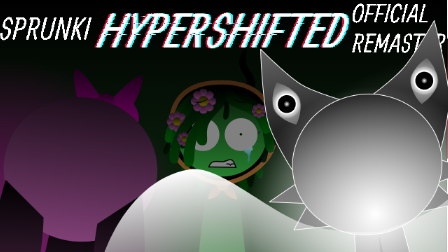
Sprunke (Sprunki) Hypershifted Phase 2 Official Remaster is Basher's dark shifted remake with redesigned characters, eerie eyes, and expanded lore.
This remaster takes the Hypershifted Phase 2 idea and gives it a sharper, more unsettling presentation. The stage is covered in deep red and orange light, with rows of watching eyes in the background, so the whole scene feels tense before you even start building the track.
The cast keeps the familiar Sprunki drag-and-drop rhythm format, but the designs lean much harder into the shifted horror style. Characters look tired, corrupted, damaged, or caught in the middle of something they do not fully understand, which makes the music feel more like a distorted scene than a normal remix.
Basher's version also feels cleaner and more complete than a rough phase edit. The character icons are organized across the lower panel, bonus characters are available above the stage, and the remaster gives the phase a stronger identity instead of only changing the colors. Each new loop adds another layer to the strange atmosphere, from uneasy rhythm parts to harsher sounds and darker melodic pieces.
What makes Hypershifted Phase 2 stand out is the contrast between the simple Sprunki mixing system and the heavy visual mood. You are still dragging characters onto the stage to make music, but the background, expressions, and shifted designs make every combination feel a little more unstable. It is a good pick if you like Sprunki mods that focus on corrupted phases, eerie visuals, and story-like horror energy rather than a bright or playful remix.
How To Play Sprunke (Sprunki): Hypershifted Phase 2 Official Remaster
Wait for the mod to finish loading, then choose character icons from the panel at the bottom of the screen.
Drag an icon onto the stage to add that character to your mix. Each character starts playing its loop as soon as it appears, so you can build the track one part at a time.
Start with a rhythm or bass character first, then add melodic, vocal, or effect characters to give the mix more shape. Because this remaster has a darker shifted sound, it works best if you layer slowly and listen to how each new loop changes the mood.
You can remove a character by clicking it again or dragging it off the stage. This is useful when the mix becomes too crowded or when one sound is overpowering the rest of the track.
The icons above the stage work as extra or bonus characters. Try them after you have a basic mix, since they can change the feel of the song and add more visual variation.
Use the menu or control buttons if you need to pause, restart, or adjust the experience. If the flashing eyes, dark colors, or horror-style presentation feel too intense, take a break and return with a simpler character setup.
Comments
Latest Games
Sprunke (Sprunki) Hypershifted Pepper’s Take
![Sprunki Reversed Phase 9 [OFFICIAL]](https://sprunkigame.io/wp-content/uploads/thumbs/custom/R/Reversed-Phase-9-OFFICIAL-300x315.png)
Sprunki Reversed Phase 9 [OFFICIAL]
Sprunki Saja Boys Treatment
Sprunke (Sprunki) 18-Shifted Pepper’s Take

Animal Hospital Sprunki
Sprunke (Sprunki) Shifted Pepper’s Take
Sprunke Crimson Cataclysm Phase 4
Sprunki 12-Shifted Pepper’s Take
Sprunki Symphony of Pride
Sprunki Phase 100
Similar Games
Sprunke (Sprunki) Hypershifted Pepper’s Take

Sprunke (Sprunki) Bi Shifted Phase 4


Sprunke (Sprunki) 18-Shifted Pepper’s Take
Sprunke (Sprunki) Shifted Pepper’s Take
Sprunke (Sprunki) Bi-Shifted
![Sprunki Reversed Phase 9 [OFFICIAL]](https://sprunkigame.io/wp-content/uploads/thumbs/custom/R/Reversed-Phase-9-OFFICIAL.png)
Sprunki Reversed Phase 9 [OFFICIAL]
Sprunke Crimson Cataclysm Phase 4
Sprunke (Sprunki) Betters And Loses Phase 4
Sprunke (Sprunki) Surviving Trio Phase 3
Sprunke (Sprunki) Betters And Loses Phase 3

![Sprunki Pyramixed V0.9 [update] but with My OCS](https://sprunkigame.io/wp-content/uploads/thumbs/custom/S/Sprunki-Pyramixed-V0.9-update-but-with-My-OCS-150x113.png)
![ParaSprunki [UPDATE 15.0 PART 2]](https://sprunkigame.io/wp-content/uploads/thumbs/custom/P/ParaSprunki-UPDATE-15.0-PART-2-150x112.png)