 Loading...
Sprunke (Sprunki) Betters And Loses Phase 4
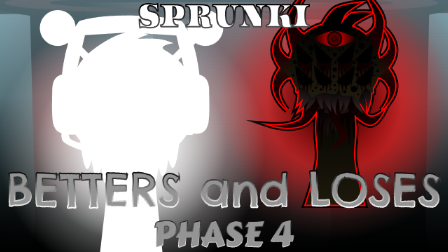
Sprunke (Sprunki) Betters And Loses Phase 4 is pepper666’s newest take on the Betters and Loses line, and it feels more chaotic than polished on purpose. The stage is constantly in motion, the default characters sway and shake even when nothing is active, and the background music has that uneasy, off-balance feel that makes the whole mod look like it is barely holding together. It is still a huge community hit on release, mostly because it turns that instability into part of the experience rather than trying to hide it.
Phase 4 keeps the same “winning vs losing” timeline idea, but here it comes across as fully unsteady and strange. The visuals never sit still for long: the background scrolls, the stage feels jittery, and even the idle state has a kind of nervous energy that makes the scene feel wrong before you even place a character. The soundtrack matches that mood, with an odd, unsettled base layer that makes the mod feel more like a fever dream than a clean music toy.
The roster still includes five bonus characters, and each one has been updated with slightly improved animation and sound compared with earlier versions. Simon is the big standout: once you activate the second-row, third-slot Simon, you cannot manually turn him off right away. He will keep flying for a while, then trigger a short cutscene and automatically unlock Oren before he finally disappears; after that, you can activate him again and close him normally. That makes him feel less like a standard loop and more like a scripted event inside the mod.
The rightmost reset button not working seems to be part of the current build as well, or at least something players have noticed and debated. Whether it is intentional or a bug, it adds to the feeling that this phase is a little unhinged. Put together, the nonstop background motion, the strange idle soundtrack, and the Simon event make Phase 4 feel more like a trapped, unstable performance than a normal Sprunki remix.
How To Play Sprunke (Sprunki) Betters And Loses Phase 4
Sprunki Betters And Loses Phase 4 uses the usual Sprunki drag-and-drop format. When the mod loads, you drag character icons onto the stage to activate their loops, and each OC adds its own sound and animation to the mix. The basic controls are simple: click or drag a character onto a slot to start it, and remove it the same way once you want to change the arrangement.
A practical way to start is:
Add one or two main characters first.
Let the background motion and idle audio settle so you can hear the mix.
Bring in bonus OCs if you want more visual movement or extra layers.
The main thing to watch for is Simon in the second row, third slot. Once activated, he will not behave like a normal character: he cannot be turned off by hand immediately, and you have to let his sequence play out until it finishes, triggers the cutscene, and unlocks Oren automatically. After that, Simon can be removed normally the next time you activate him.
One more caution: the reset button in the upper-right corner does not currently seem to respond reliably. Because of that, it is safer to plan your mix carefully and use character removal rather than depending on a full reset. If you want to explore the mod without getting stuck in its stranger states, test characters one by one before stacking too much at once.
Comments
Latest Games
Sprunke (Sprunki) Hypershifted Pepper’s Take
![Sprunki Reversed Phase 9 [OFFICIAL]](https://sprunkigame.io/wp-content/uploads/thumbs/custom/R/Reversed-Phase-9-OFFICIAL-300x315.png)
Sprunki Reversed Phase 9 [OFFICIAL]
Sprunki Saja Boys Treatment
Sprunke (Sprunki) 18-Shifted Pepper’s Take

Animal Hospital Sprunki
Sprunke (Sprunki) Shifted Pepper’s Take
Sprunke (Sprunki): Hypershifted Phase 2 Official Remaster
Sprunke Crimson Cataclysm Phase 4
Sprunki 12-Shifted Pepper’s Take
Sprunki Symphony of Pride
Similar Games
Sprunke (Sprunki) Betters And Loses Phase 3

Sprunke (Sprunki) Surviving Trio Phase 3

Sprunke (Sprunki) Anti-Shifted Pepper’s Take
Sprunke (Sprunki) Infected Remastered
Sprunke (Sprunki) Beat Attack
Sprunke (Sprunki) Pepper’s Realm

Sprunke (Sprunki) Surviving Trio
Sprunke (Sprunki) 18-Shifted Pepper’s Take
Sprunke (Sprunki) Hypershifted Pepper’s Take
Sprunke (Sprunki) Shifted Pepper’s Take

![Sprunki Pyramixed V0.9 [update] but with My OCS](https://sprunkigame.io/wp-content/uploads/thumbs/custom/S/Sprunki-Pyramixed-V0.9-update-but-with-My-OCS-150x113.png)
![ParaSprunki [UPDATE 15.0 PART 2]](https://sprunkigame.io/wp-content/uploads/thumbs/custom/P/ParaSprunki-UPDATE-15.0-PART-2-150x112.png)