 読み込み中...
Sprunki 9-Shifted (Niki and Footlong’s Take)
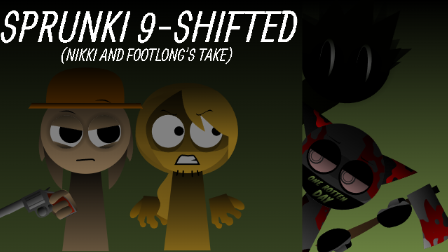
Sprunki 9-Shifted (Niki and Footlong's Take) is a horror music mod set beneath a sickly green sky full of watching eyes.
Niki and Footlong Nachos made this version together, starting with an idea from Niki. Oren keeps his orange headphones, but now has wide, startled eyes and wounds across his cheek. Even the empty performers have different expressions: some look worried, while one near the right seems strangely pleased. Behind them, black clouds drift past a small orange sun.
You build the music by dragging characters onto the stage and changing the lineup as you go. There are extra performers in a separate row above the main cast, and some take the mod in a much sillier direction. A bright SpongeBob-and-pineapple character looks particularly out of place against the gloomy background. The horror comes with a fair amount of messing around.
The Gallery has more artwork and notes from the creators, including Lee, a pink-haired character identified as a friend's OC. It also contains the production credits. Its spoiler warning is worth following if you want to see the performers in action before browsing their designs.
Expect blood, visible injuries, and disturbing character imagery.
How To Play Sprunki 9-Shifted (Niki and Footlong’s Take)
- 1.Start the game and wait for the stage and character icons to load.
- 2.Drag an icon from the lower panel onto an empty performer to add that character to your mix.
- 3.Add more characters gradually and experiment with different combinations.
- 4.Hover over an active performer to reveal their controls. Use the speaker icon to mute, the headphones to solo, or the X to remove them.
- 5.Drag icons from the additional row above the stage to try the extra performers.
- 6.Click the circular arrow at the upper right to clear the stage and begin another mix.
- 7.Open the Gallery using the portrait icon near the upper left. Browse with the arrow buttons and select Close to return to the stage.
Comments
Latest Games
Sprunki 13-Shifted Niki’s Take
Sprunke (Sprunki) Hypershifted Pepper’s Take
![Sprunki Reversed Phase 9 [OFFICIAL]](https://sprunkigame.io/wp-content/uploads/thumbs/custom/R/Reversed-Phase-9-OFFICIAL-300x315.png)
Sprunki Reversed Phase 9 [OFFICIAL]
Sprunki Saja Boys Treatment
Sprunke (Sprunki) 18-Shifted Pepper’s Take

Animal Hospital Sprunki
Sprunke (Sprunki) Shifted Pepper’s Take
Sprunke (Sprunki): Hypershifted Phase 2 Official Remaster
Sprunke Crimson Cataclysm Phase 4
Sprunki 12-Shifted Pepper’s Take
Similar Games
Sprunki 13-Shifted Niki’s Take

![Sprunki Reversed Phase 9 [OFFICIAL]](https://sprunkigame.io/wp-content/uploads/thumbs/custom/R/Reversed-Phase-9-OFFICIAL.png)
Sprunki Reversed Phase 9 [OFFICIAL]

Sprunke (Sprunki) 18-Shifted Pepper’s Take

Sprunke (Sprunki) Shifted Pepper’s Take
Sprunki 12-Shifted Pepper’s Take
Sprunke (Sprunki) Bi Shifted Phase 4
Sprunki Phase 12 Remastered (Footlong’s Take)
Sprunki Re-Remastered Footlong’s Take
Sprunki Phase 5 REMASTERED (Footlong’s Take)
Türk Jevin’s Sprunki Phase 9 REMASTERED (FootlongNachos’s Take)

![Sprunki Pyramixed V0.9 [update] but with My OCS](https://sprunkigame.io/wp-content/uploads/thumbs/custom/S/Sprunki-Pyramixed-V0.9-update-but-with-My-OCS-150x113.png)
![ParaSprunki [UPDATE 15.0 PART 2]](https://sprunkigame.io/wp-content/uploads/thumbs/custom/P/ParaSprunki-UPDATE-15.0-PART-2-150x112.png)