 Loading...
Sprunke (Sprunki) Shifted Pepper’s Take
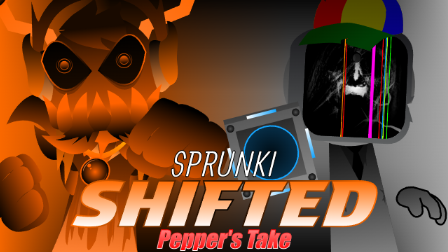
Sprunke (Sprunki) Shifted Pepper's Take is pepper666's orange-brown shifted remix with brutal horror scenes, alt sounds, and corrupted OC designs.
According to the creator, the goal of this mod is to show shifts in a completely different direction, and that idea comes through immediately. Instead of feeling like a clean phase edit, Pepper's Take turns the shifted style into something heavier, stranger, and more chaotic.
The whole stage is covered in a burnt orange-brown tone, with blood-stained characters, warning-like symbols, chains, oversized shapes, and harsh lighting effects packed into the screen. The result feels aggressive and overloaded on purpose, almost like a rough horror remix that wants to push every OC into a more unstable form.
Player reactions on Cocrea also point in the same direction: people call out pepper666's unique designs, describe the mod as peak, and even joke that the visual energy is so intense it feels like an acid trip. That fits the mod well, because it is not trying to be smooth or pretty. It is messy, loud, and built around corrupted character changes.
The ALT SOUNDS row makes this version more interesting than a simple visual reskin. You can use the main icons for the core mix, then test alternate sounds to make the track rougher or more distorted. When several characters are active at once, the mod can feel crowded and heavy, but that over-the-top pressure is part of its identity.
Sprunke Shifted Pepper's Take is best for players who like the darker side of Sprunki fan mods. It keeps the drag-and-drop music format, but the mood is closer to a horror remix built around chaos, damage, and uncomfortable visual energy rather than a normal shifted update.
How To Play Sprunke (Sprunki) Shifted Pepper’s Take
Wait for the mod to load, then choose character icons from the panel at the bottom of the screen.
Drag an icon onto the stage to add that character to the mix. Each OC starts playing its loop immediately, so build the track one layer at a time instead of filling every slot too quickly.
Start with one or two rhythm characters to create a base. After that, add louder, stranger, or more distorted characters to push the shifted sound further.
Use the ALT SOUNDS row when you want a rougher version of the mix. These alternate icons can change the sound or intensity of the track, so try them after you understand how the main characters work.
If a character makes the mix too crowded, click it again or drag it away from the stage to remove it. This helps you test different combinations without restarting the whole mod.
Use the Credit, Gallery, and Setting buttons if you want to check extra information, view related material, or adjust the experience. The restart button in the corner can reset the scene if the screen becomes too busy.
Because this mod uses intense horror visuals, blood, dark lighting, and aggressive character designs, it is better suited for players who already enjoy scary Sprunki-style remixes.
Comments
2 Comments
Leave a Comment
Latest Games
Sprunki 13-Shifted Niki’s Take
Sprunke (Sprunki) Hypershifted Pepper’s Take
![Sprunki Reversed Phase 9 [OFFICIAL]](https://sprunkigame.io/wp-content/uploads/thumbs/custom/R/Reversed-Phase-9-OFFICIAL-300x315.png)
Sprunki Reversed Phase 9 [OFFICIAL]
Sprunki Saja Boys Treatment
Sprunke (Sprunki) 18-Shifted Pepper’s Take

Animal Hospital Sprunki
Sprunke (Sprunki): Hypershifted Phase 2 Official Remaster
Sprunke Crimson Cataclysm Phase 4
Sprunki 12-Shifted Pepper’s Take
Sprunki Symphony of Pride
Similar Games
Sprunke (Sprunki) 18-Shifted Pepper’s Take

Sprunke (Sprunki) Hypershifted Pepper’s Take

Sprunki 12-Shifted Pepper’s Take
Sprunke (Sprunki) Anti-Shifted Pepper’s Take
Sprunke (Sprunki) Bi Shifted Phase 4

Sprunke (Sprunki) Pepper’s Realm
Sprunke (Sprunki): Hypershifted Phase 2 Official Remaster
Sprunke (Sprunki) Infected Remastered
Sprunke (Sprunki) Betters And Loses Phase 4
Sprunke (Sprunki) Beat Attack

![Sprunki Pyramixed V0.9 [update] but with My OCS](https://sprunkigame.io/wp-content/uploads/thumbs/custom/S/Sprunki-Pyramixed-V0.9-update-but-with-My-OCS-150x113.png)
![ParaSprunki [UPDATE 15.0 PART 2]](https://sprunkigame.io/wp-content/uploads/thumbs/custom/P/ParaSprunki-UPDATE-15.0-PART-2-150x112.png)

WOW I LIKE IT THAT WAS SICK
it takes forever