 Loading...
Sprunki 13-Shifted Niki’s Take
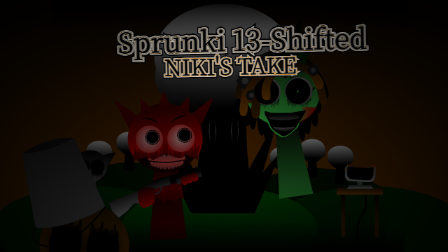
Sprunki 13-Shifted Niki's Take is a horror music mod by Niki with an amber sky, watchful clouds, and a damaged cast.
Black clouds filled with staring eyes hang above dark green hills. The performers stand against an orange-brown sky, with enough light to reveal their injuries and strange expressions. An orange character wears headphones around a wounded face, a purple performer spreads large wings across the stage, and a bucket-headed figure has hollow black eyes above a crooked grin. These small details give Niki's version of 13-Shifted its uneasy atmosphere.
You build the music by dragging icons onto the seven stage positions. Each selection brings in a character and their sound, letting you try different combinations or strip the mix back to a few parts. The character controls let you mute individual performers, listen to one on its own, or remove them before trying another arrangement.
Some players have praised the ambience and taken an interest in the character lore. The Gallery gives that discussion something concrete to explore: Pinki is still alive and hiding in a forest, while Oren visits her every day. Her flower-covered design and words of support offer a gentler moment within the mod's disturbing setting. The Gallery also includes additional character artwork and production credits, with a spoiler warning for anyone who would rather discover the cast through playing first.
The mod contains injury imagery and unsettling character designs, which may be unsuitable for younger players.
How To Play Sprunki 13-Shifted Niki’s Take
- 1.Start the game and wait for the stage and character icons to appear.
- 2.Drag an icon from the bottom panel onto an empty character to add that performer to your mix.
- 3.Add more performers gradually and try different combinations of sounds.
- 4.Move the pointer over an active performer to reveal their controls. Use the speaker icon to mute, the headphones to solo, or the X to remove them.
- 5.Click the circular arrow at the upper right to clear the stage and start a new mix.
- 6.Click the portrait icon near the upper left to open the Gallery. Use its arrows to 7.browse the artwork and credits, then select Close to return. The Gallery contains character spoilers.
Comments
Latest Games
Sprunke (Sprunki) Hypershifted Pepper’s Take
![Sprunki Reversed Phase 9 [OFFICIAL]](https://sprunkigame.io/wp-content/uploads/thumbs/custom/R/Reversed-Phase-9-OFFICIAL-300x315.png)
Sprunki Reversed Phase 9 [OFFICIAL]
Sprunki Saja Boys Treatment
Sprunke (Sprunki) 18-Shifted Pepper’s Take

Animal Hospital Sprunki
Sprunke (Sprunki) Shifted Pepper’s Take
Sprunke (Sprunki): Hypershifted Phase 2 Official Remaster
Sprunke Crimson Cataclysm Phase 4
Sprunki 12-Shifted Pepper’s Take
Sprunki Symphony of Pride
Similar Games
Sprunke (Sprunki) 18-Shifted Pepper’s Take

Sprunki 12-Shifted Pepper’s Take

Sprunke (Sprunki) Bi Shifted Phase 4

Sprunki Hyper Shifted Phase 3 Oren’s Massacre
Sprunke (Sprunki) Bi-Shifted
Sprunki Shifted Phase 3 Recreation (new update)
Sprunke (Sprunki) Shifted Pepper’s Take
Sprunke (Sprunki) Hypershifted Pepper’s Take
![Sprunki Reversed Phase 9 [OFFICIAL]](https://sprunkigame.io/wp-content/uploads/thumbs/custom/R/Reversed-Phase-9-OFFICIAL.png)
Sprunki Reversed Phase 9 [OFFICIAL]
Sprunke (Sprunki): Hypershifted Phase 2 Official Remaster

![Sprunki Pyramixed V0.9 [update] but with My OCS](https://sprunkigame.io/wp-content/uploads/thumbs/custom/S/Sprunki-Pyramixed-V0.9-update-but-with-My-OCS-150x113.png)
![ParaSprunki [UPDATE 15.0 PART 2]](https://sprunkigame.io/wp-content/uploads/thumbs/custom/P/ParaSprunki-UPDATE-15.0-PART-2-150x112.png)