 Cargando...
Sprunke (Sprunki) Anti-Shifted Pepper’s Take
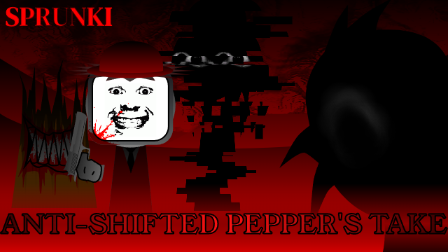
Sprunke (Sprunki) Anti-Shifted Pepper's Take is pepper666’s brutal rework of FootLongNachos’ Anti-Shifted idea. It takes the familiar shifted-timeline concept and pushes it harder into gore, chaos, and unstable visuals, with the camera swaying left and right in time with the beat so the whole screen feels off-balance. The creator even warns that “MFC has a very funny name and description,” which fits the mod’s vibe of being intentionally unsettling and a little unhinged.
This is not a soft horror remix. Pepper666’s version turns the Anti-Shifted world into something much bloodier and more frantic, with characters drawn in a violent, corrupted style and audio that feels harsher and more aggressive than the original template. Most of the roster is pushed into that disturbing look, while only the last few bonus characters come across as relatively normal by comparison.
The mod’s visual identity is built around motion and discomfort. The camera shakes with the rhythm, the stage feels unstable, and the character animations are meant to look chaotic rather than clean. That makes the whole experience feel like you are watching a damaged timeline unravel in real time, with each added OC making the scene more intense. If you like the Anti-Shifted concept but want something darker and more violent, this is the version that leans all the way in.
Because the mod is so intense, it is clearly aimed at mature players. The blood-heavy design, the aggressive movement, and the overall sense of madness make it a poor fit for younger users or anyone sensitive to horror imagery. It is one of those Sprunki mods that looks wild even before you start layering sounds, and then gets even harder to look at once the mix begins.
How To Play Sprunke (Sprunki) Anti-Shifted Pepper’s Take
Sprunki Anti-Shifted Pepper’s Take follows the standard Sprunki drag-and-drop format. When the game loads, you see character icons and an empty stage. Drag an icon onto the stage to activate that OC and start its loop, then keep adding characters to build the track.
Basic play:
Start with a beat or bass character to lock in the rhythm.
Add melody and effect characters to deepen the mix.
Use the bonus characters once you want extra sound layers or a different visual tone.
Because the mod is so visually aggressive, it helps to add characters slowly and watch how each one changes the screen. The camera sway and bloodier animations build up as more OCs are activated, so you can treat the mix like a slow descent into chaos rather than a full-stack all at once. If you want a less overwhelming experience, save the most intense characters for last.
You can remove a character by clicking it again or dragging it off the stage, which stops that loop and frees the slot. The last bonus characters are a bit more restrained visually, so they are useful if you want to calm the scene down slightly without breaking the mix completely.
Comments
Latest Games
Sprunki Saja Boys Treatment
Sprunke (Sprunki) 18-Shifted Pepper’s Take

Animal Hospital Sprunki
Sprunke (Sprunki) Shifted Pepper’s Take
Sprunke (Sprunki): Hypershifted Phase 2 Official Remaster
Sprunke Crimson Cataclysm Phase 4
Sprunki 12-Shifted Pepper’s Take
Sprunki Symphony of Pride
Sprunki Phase 100
Spunki Phase 2.5 Definitive Edition (ANNIVERSARY EDITION)
Similar Games
Sprunke (Sprunki) 18-Shifted Pepper’s Take

Sprunke (Sprunki) Shifted Pepper’s Take


Sprunke (Sprunki) Pepper’s Realm
Sprunke (Sprunki) Infected Remastered
Sprunke (Sprunki) Betters And Loses Phase 4
Sprunke (Sprunki) Beat Attack
Sprunke (Sprunki) Surviving Trio Phase 3
Sprunke (Sprunki) Surviving Trio
Sprunke (Sprunki) Betters And Loses Phase 3
Sprunki 12-Shifted Pepper’s Take

![Sprunki Pyramixed V0.9 [update] but with My OCS](https://sprunkigame.io/wp-content/uploads/thumbs/custom/S/Sprunki-Pyramixed-V0.9-update-but-with-My-OCS-150x113.png)
![ParaSprunki [UPDATE 15.0 PART 2]](https://sprunkigame.io/wp-content/uploads/thumbs/custom/P/ParaSprunki-UPDATE-15.0-PART-2-150x112.png)