 Loading...
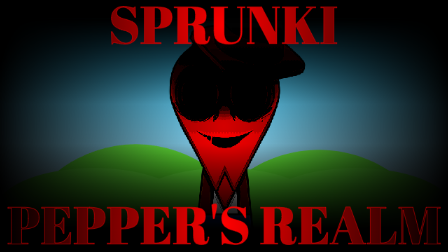
Sprunke (Sprunki) Pepper’s Realm
Sprunke (Sprunki) Pepper’s Realm is a new pepper666 mod that looks calm at first glance, but it is built around a nasty surprise. The base roster feels fairly standard, with eight bonus characters and the usual Sprunki-style cast, yet activating Pepper and clicking him again pulls the whole mod into a second phase that turns chaotic, violent, and extremely hard to look at for long. FootLongNachos and other community creators have also pointed people to the release, which is one reason it spread so quickly across the Sprunki scene.
Pepper’s Realm starts out like a relatively normal Sprunki horror mod, but that calm surface is basically a trap. The early stage uses familiar character designs and traditional audio roles, so at first it feels more restrained than pepper666’s louder, bloodier projects. Then Pepper—the chili-headed mascot who defines the creator’s style—becomes the key to the whole thing: once activated and clicked again, he flips the mod into a hidden second phase that floods the screen with frantic motion, harsher visuals, and a much more aggressive soundscape.
That second phase is what people are talking about when they say the mod is chaotic. The visuals reportedly become dense, flashing, and disorienting, and the audio ramps up into a noisy, unstable mix rather than a clean song structure. The effect is so intense that some community players have warned others about flashing imagery and the possibility of discomfort, especially for anyone sensitive to seizure-like visual triggers. In other words, this is one of those Sprunki mods that behaves politely only until you touch the wrong character.
The bonus cast adds some replay value before the transformation kicks in. Those eight extra characters expand the mix and give the first phase more room to breathe, but they are really there to set the table for Pepper’s hidden break into madness. The contrast is part of the appeal: a fairly ordinary front end, followed by a second stage that feels like the realm itself is collapsing under Pepper’s control.
How To Play Sprunke (Sprunki) Pepper’s Realm
Sprunke (Sprunki) Pepper’s Realm follows the usual Sprunki drag-and-drop format. When the mod loads, you will see character icons and an empty stage. Drag an icon onto the stage to activate that OC and start its loop, then stack more characters to build the track.
The important part is Pepper himself. To reach the hidden second phase, activate Pepper and then click him again. That extra click is what pushes the mod from the normal state into the chaotic horror phase, so if you are testing the mod for the first time, it is worth saving Pepper for when you are ready for the full effect.
A simple way to play is:
Build a normal mix first using the standard roster.
Try the eight bonus characters for extra variations.
Add Pepper last if you want to trigger the hidden phase on purpose.
Once the second phase starts, the same basic controls still apply: click a character again or drag them off the stage to remove them, which stops their loop. But because the visuals and camera effects become much more intense, it is better to trigger Pepper’s transformation only when you actually want to see the full horror sequence.
If you are sensitive to flashing effects or easily overwhelmed by dense visual noise, this is not the mod to rush into. The mechanics are simple, but the hidden phase makes careful timing and a steady screen a lot more important than in a typical Sprunki remix.
Comments
3 Comments
Leave a Comment
Latest Games
Sprunki 9-Shifted (Niki and Footlong’s Take)
Sprunki 13-Shifted Niki’s Take
Sprunke (Sprunki) Hypershifted Pepper’s Take
![Sprunki Reversed Phase 9 [OFFICIAL]](https://sprunkigame.io/wp-content/uploads/thumbs/custom/R/Reversed-Phase-9-OFFICIAL-300x315.png)
Sprunki Reversed Phase 9 [OFFICIAL]
Sprunki Saja Boys Treatment
Sprunke (Sprunki) 18-Shifted Pepper’s Take

Animal Hospital Sprunki
Sprunke (Sprunki) Shifted Pepper’s Take
Sprunke (Sprunki): Hypershifted Phase 2 Official Remaster
Sprunke Crimson Cataclysm Phase 4
Similar Games
Sprunke (Sprunki) Anti-Shifted Pepper’s Take


Sprunke (Sprunki) 18-Shifted Pepper’s Take
Sprunke (Sprunki) Hypershifted Pepper’s Take
Sprunke (Sprunki) Shifted Pepper’s Take

Sprunke (Sprunki) Infected Remastered
Sprunke (Sprunki) Betters And Loses Phase 4
Sprunke (Sprunki) Beat Attack
Sprunke (Sprunki) Surviving Trio Phase 3
Sprunke (Sprunki) Surviving Trio
Sprunke (Sprunki) Betters And Loses Phase 3

![Sprunki Pyramixed V0.9 [update] but with My OCS](https://sprunkigame.io/wp-content/uploads/thumbs/custom/S/Sprunki-Pyramixed-V0.9-update-but-with-My-OCS-150x113.png)
![ParaSprunki [UPDATE 15.0 PART 2]](https://sprunkigame.io/wp-content/uploads/thumbs/custom/P/ParaSprunki-UPDATE-15.0-PART-2-150x112.png)

this is horor
Ok I’m not sensitive and don’t get overwhelmed easily so I can play
ini horor