Sprunke (Sprunki) Betters And Loses Phase 2
Sprunke (Sprunki) Betters And Loses Phase 2


 Loading...
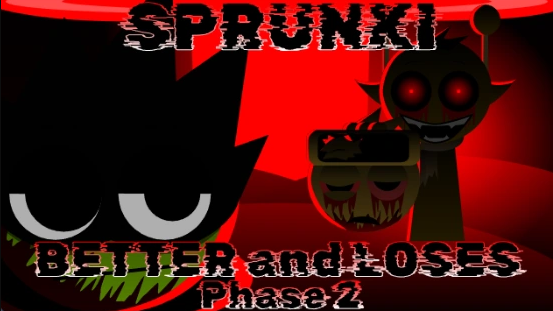
Sprunke (Sprunki) Betters And Loses Phase 2 is a fiery horror remix mod by РЭД анархий (pepper666), now one of the most talked‑about projects in the Sprunki scene. The name uses “Sprunke” for visibility reasons, but it firmly belongs to the wider Sprunki universe and continues the Betters vs Losers concept with a much hotter, more intense twist.
In this phase, the original “Betters” and “Losers” theme collapses into full‑on corruption: characters that once felt competitive or playful now look twisted, burned, or melted by a red‑coded contagion, often linked in fan lore to a “Red Signal” or similar glitching force. Visuals lean into pepper666’s hot, chili‑inspired branding, with blazing color palettes, glowing reds and oranges, and aggressive motion that makes every OC feel like they are boiling under pressure instead of just “spooky”.
The sound design matches that intensity: heavy industrial beats, glitchy FX bursts, and distorted screams or chants are layered to feel more like a psychological horror soundscape than a typical rhythm track. Five bonus characters round out the cast, giving players extra options and slightly different tones to work with while still fitting the mod’s overheated, high‑energy style.
How To Play Sprunke (Sprunki) Betters And Loses Phase 2
You launch Sprunki Betters And Loses Phase 2 in the browser through hosts like sprunkigame.io, where it runs like a standard Sprunki‑style drag‑and‑drop music mod. Once the phase loads, the roster of OCs appears as icons along the bottom of the screen; each icon represents a specific loop type such as beats, effects, melodies, or tortured vocals.
To build a track, you drag an icon onto the main stage area: the character spawns and immediately starts performing its loop, adding a piece of rhythm, noise, or voice to the mix. You can layer multiple OCs at once to stack industrial drums, glitch FX, and vocals into a chaotic wall of sound, then remove or mute characters by clicking them or dragging them off the stage to carve out space again. The horror atmosphere rewards experimentation: certain combinations can heighten the sense of “corruption,” and careful use of silence or minimal layers can make drops, screams, or specific bonus characters land much harder in your final mix.
Comments
Latest Games
Sprunke (Sprunki) Surviving Trio
Sprunke (Sprunki) Betters And Loses Phase 3
Türk Jevin’s Sprunki Phase 9 REMASTERED (FootlongNachos’s Take)
Incredibox – Sprunkicat 3.0
Sprunked Legacy (W.I.P)
Sprunki Conjunctivania (Pinkeye Treatment Footlong’s Take)
Sprunke (Sprunki) Hyper Shifted Phase 4
Sprunki pyramixed DELUXE (read desc) Upd-Coming
Sprunkfection Apocalypse Now
Sprunki Phase 12 Definitive (OFFICIAL)
Similar Games
Sprunke (Sprunki) Surviving Trio
Sprunke (Sprunki) Betters And Loses Phase 3
Türk Jevin’s Sprunki Phase 9 REMASTERED (FootlongNachos’s Take)
Incredibox – Sprunkicat 3.0
Sprunked Legacy (W.I.P)
Sprunki Conjunctivania (Pinkeye Treatment Footlong’s Take)
Sprunke (Sprunki) Hyper Shifted Phase 4

Sprunki pyramixed DELUXE (read desc) Upd-Coming
Sprunkfection Apocalypse Now
Sprunki Phase 12 Definitive (OFFICIAL)
![Sprunki Pyramixed V0.9 [update] but with My OCS](https://sprunkigame.io/wp-content/uploads/thumbs/custom/S/Sprunki-Pyramixed-V0.9-update-but-with-My-OCS-150x113.png)

![ParaSprunki [UPDATE 15.0 PART 2]](https://sprunkigame.io/wp-content/uploads/thumbs/custom/P/ParaSprunki-UPDATE-15.0-PART-2-150x112.png)