
Sprunked Legacy (W.I.P)
Sprunked Legacy (W.I.P)

 Cargando...
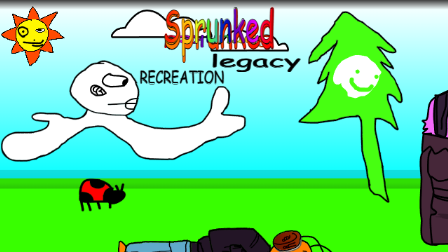
Sprunked Legacy (W.I.P) is a work‑in‑progress Sprunki‑style mod by GFFNFCOSMO that leans hard into a playful, hand‑drawn aesthetic. Every OC is sketched to look like it was drawn by a kid on a tablet or paint app: wobbly outlines, uneven coloring, and simple shapes that feel intentionally “childish.” Under that silly surface, though, the designs still land all the key details for each character, so they remain visually readable and expressive instead of random doodles. The whole mod is non‑horror, with no scary mode or gore, which makes it friendly for younger players or anyone who wants something light and charming instead of frightening.
The standout design idea in Sprunked Legacy is how it treats character selection and control. Instead of dumping all characters in one long, crowded strip like many older mods, it introduces a proper page‑turning system for browsing OCs. You can flip through multiple pages of icons with simple clicks, which keeps the interface clean even though the cast has grown to forty‑nine characters. On top of that, the mod adds per‑character audio tools such as individual volume adjustment and mute, so you can fine‑tune exactly how loud each OC is in the mix or temporarily silence one without removing them. Combined with the harmless, storybook‑like art style, it feels more like a creative toy box than a horror experience.
How To Play Sprunked Legacy (W.I.P)
You play Sprunked Legacy (W.I.P) like other Sprunki‑style projects, using drag‑and‑drop and simple clicks to assemble your track.
Basic controls:
When the mod loads, you see a row or panel of OC icons at the bottom or side of the screen.
Use the page‑turn buttons (for example, arrows or labeled tabs) to move between pages of characters; this is how the mod comfortably fits all forty‑nine OCs without clutter.
To add a character, click and drag their icon onto an empty slot on the main stage. As soon as they appear, they start playing their loop in time with the overall beat.
Mixing and features:
Start by placing one or two rhythm OCs (kicks, snares, simple percussion) to build a foundation.
Add bass and melody OCs next, then sprinkle in effects or ambient characters to fill the space.
Each character has its own small volume control: you can lower a part that feels too loud or boost a quiet one without touching the global volume.
You can also mute a specific OC with a single click on its mute control, which keeps them on stage but silenced. This is useful for testing drops, breakdowns, or alternate versions of your mix.
Managing characters:
To remove a character entirely, click on them or drag them off the stage; their loop stops and the slot becomes free for someone else.
Because there is no horror mode, you do not have to worry about triggering scary transformations by certain combinations—experimentation is safe and focused on sound rather than scares.
Comments
Latest Games
Sprunki Conjunctivania (Pinkeye Treatment Footlong’s Take)
Sprunke (Sprunki) Hyper Shifted Phase 4
Sprunki pyramixed DELUXE (read desc) Upd-Coming
Sprunkfection Apocalypse Now
Sprunki Phase 12 Definitive (OFFICIAL)
Sprunki Phase 5 Definitive The Fatal Lie
Sprunke (Sprunki) Betters And Loses Phase 2
Sprunki Anti Shifted: Phase 5
Sprunki Phase 44 Remake Bars
Sprunki Hyper Shifted Phase 3 Oren’s Massacre
Similar Games
Sprunki Conjunctivania (Pinkeye Treatment Footlong’s Take)

Sprunke (Sprunki) Hyper Shifted Phase 4

Sprunki pyramixed DELUXE (read desc) Upd-Coming
Sprunkfection Apocalypse Now
Sprunki Phase 12 Definitive (OFFICIAL)
Sprunki Phase 5 Definitive The Fatal Lie
Sprunke (Sprunki) Betters And Loses Phase 2
Sprunki Anti Shifted: Phase 5
Sprunki Phase 44 Remake Bars
Sprunki Hyper Shifted Phase 3 Oren’s Massacre
![Sprunki Pyramixed V0.9 [update] but with My OCS](https://sprunkigame.io/wp-content/uploads/thumbs/custom/S/Sprunki-Pyramixed-V0.9-update-but-with-My-OCS-150x113.png)

![ParaSprunki [UPDATE 15.0 PART 2]](https://sprunkigame.io/wp-content/uploads/thumbs/custom/P/ParaSprunki-UPDATE-15.0-PART-2-150x112.png)